Transparent Screenshot Capture for Modern Teams
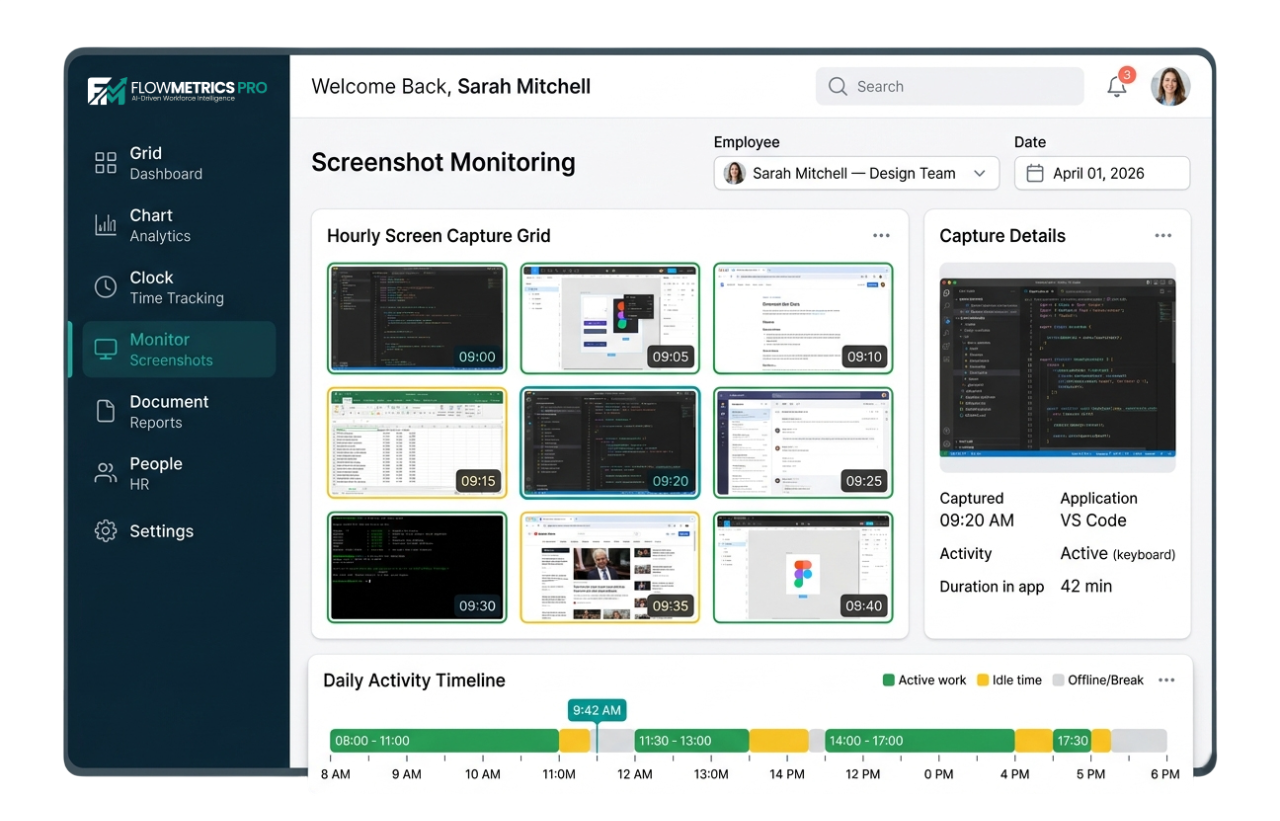
Automatically capture work activity to understand progress. Built to be transparent and fair — so your team stays accountable without losing trust.
Key Benefits
Everything you need for effective, ethical visual monitoring of remote and hybrid teams.
Configurable Intervals
Capture screenshots every 5 minutes on Professional, or as often as every minute on Enterprise. You decide how frequently it runs.
HD Quality Captures
High-resolution screenshots so you can clearly see active work and open apps.
Blur Sensitive Content
Automatically detect and blur sensitive information like passwords, personal messages, and banking details.
Organized Timeline View
View screenshots in a simple timeline. Filter by employee, date, or project to quickly find what you need.
How It Works
Get started with screenshot capture in four simple steps.
Install Desktop App
Download and install the FlowMetrics desktop app on Windows, macOS, or Linux.
Set Capture Intervals
Choose how often screenshots are taken based on your team's workflow and plan.
Screenshots Auto-Captured
Screenshots are captured at your chosen intervals and securely uploaded to the cloud.
Review in Dashboard
Review, filter, and explore all captures in a timeline from your dashboard.
Plan Availability
Screenshot capture is available on all plans with increasing capture frequency.
Free
Every 30 min (720p)
check_circleIncluded
Starter
Every 10 min (1080p)
check_circleIncluded
Professional
Every 5 minutes (HD)
check_circleIncluded
Enterprise
Every 1 minute (HD)
check_circleIncluded
See what your team is working on
Start your 14-day free trial. No credit card required.